
It's simple to get up and running with MYOB and Joiin.
You start by following a few simple steps to connect your MYOB organisation(s) to Joiin - once they're connected you don't need to perform this task again - from that point on your data will be refreshed automatically every 24 hours.
NOTE: Joiin supports direct connection to MYOB AccountRight and MYOB Business (formerly Essentials) products. Other MYOB products may not be supported via direct connection but may still be used through our Manual Company Import feature or our Public API company add/update end points.
To Connect your MYOB Organisations
- Go to the Companies page.
- Click on Add Company and select MYOB.
- You'll be taken to the login page of MYOB - login with your MYOB account details as you normally do. You will then be presented with the connection screen.
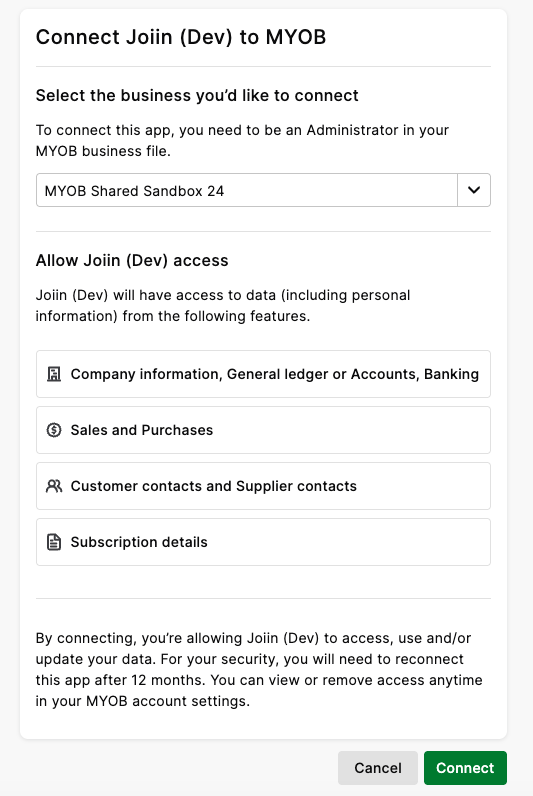
- Once logged in and the connection is made, you will return to Joiin and data synchronisation will begin.
- You have the option to connect another company at this point if required - you can connect as many companies as you wish simultaneously (within the limits of your subscription).
- While the data sync is in progress you will see a message on the company indicating that the data is loading.
- Once the data has loaded the message will change to show the last time the data was refreshed - Joiin will automatically refresh the data every 24 hours.
Now you're ready to run reports against that company. For more information on running, reports see the Running Reports user guide.
You can view your list of companies any time on the Companies page. There you can also:
- Change the period data is imported for - by default Joiin pulls the data from MYOB for the previous 3 and next 2 fiscal years - if you want to go back further you can change these settings.
- Manually refresh data from MYOB - Joiin will automatically refresh your data every day but if you've updated something in MYOB and want to pull in the latest data you can refresh manually.
- Change the order companies appear in the report filters and the Compare by Company view.
NOTE: MYOB requires re-authorisation every 12 months. If 12 months has elapsed since you connected, you may see a Refresh error again the company on the companies page. You can follow the prompts to re-connect to re-authorise.