
TABLE OF CONTENTS
Overview
Ask Joiin AI is an Agentic LLM (Large Language Model) Chat tool built into Joiin. It works like other chat tools such as ChatGP or Google Gemini but operates within the Joiin environment and so has all the context relating to your Joiin data. It is also "Agentic" in that it will automatically kick-off agents which run Joiin reports and collect other data, required to answer your question.
It is powered by the Joiin Intelligence platform which you can read more about here.
How It Works
Ask Joiin AI works like any other chat tool - you ask it any question and it will submit this question to the Joiin Intelligence LLM along with any context from your Joiin environment. The LLM will answer your question and, in doing so, may also execute reports and run agents to obtain additional information and perform tasks.
To start, click on the Joiin AI menu item on the left menu - alternatively click on Chat with Us on the left menu. When Chat with Us is opened from a report or report pack, the chat knows what you're viewing, so you can ask about it directly.
Then simply type any question into the text box and click submit. Joiin AI will process your question and return an answer - from there you can submit further questions and continue to interact with the chat tool to get the information you need.
If you wish to copy an answer you can click on the copy icon at the bottom of each response - this will copy it into your clipboard so you can paste it elsewhere, e.g. another document or an email.
Prompt Library
A few examples of prompts you could give AI are displayed below the chat box. Click on these to see how the AI Chat answers. You can click on Browse Prompts to bring up a more extensive list of examples. We are adding to the prompt library all the time, based on feedback from real users.
Agents and Agent Selector
AI agents are specialised assistants inside the chat that help with certain tasks. When you chat with our AI agents may be invoked automatically depending on what you ask. You can also select Agents specifically through the Agent dropdown at the top left.
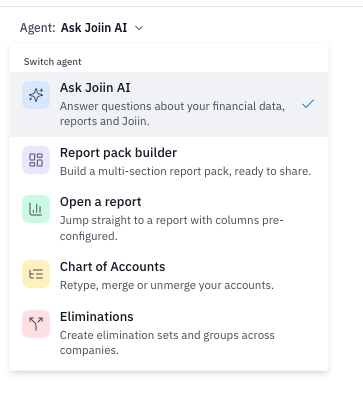
By selecting an agent like this you are instructing the chat to behave in a certain way - you can to continue to chat about anything but the tool will be pre-disposed to work on the specific task you have selected.
The AI Chat tools has more and more agents added over time - see the Joiin Intelligence article for more info.
Chat History
A history of all your chats gets stored in a list on the left hand side. You can click on a previous chat to bring it up into the main window and continue the conversation. The context from that chat will be retained and you can continue to ask questions and Joiin AI will remember what was previously discussed in that thread.
You can search for previous chats by entering text in the search bar at the top.
To start a new chat from scratch click on the New Chat button.
Ask a Human
If you're finding the answers you're looking for with Joiin AI you can transfer your chat to one of our support operatives at any time simply by clicking on the Talk to human link below the Ask button. You will be redirected to our support portal chat tool which will open in a popup window. Your chat will be summarised and you will be connected to a support agent and you can ask further questions.
NOTE: If all our agents are offline you will be given the option to create a support ticket. One of our team will pick up the ticket as soon as possible and get back to you.